VTracer turns a PNG into an SVG in one call, but it does not give you layers. On my test image it wrote 517 <path> elements with 508 different fill colors and not a single <g>. If you want a layered SVG, where each color sits in its own group that you can recolor or hide with one attribute, you have to build that structure yourself.
This post does that three ways on one photo: potrace one color at a time, VTracer with its paths regrouped by color, and imagetracerjs in Node. Every number comes from running the scripts below. At the end I cover what color layers can't do, and why splitting by color is not the same as splitting by element (text, subject, background).
Setup: VTracer, potrace and imagetracerjs versions
Versions used, all on macOS:
- VTracer 0.6.15 from PyPI (the current stable
pip install vtracer), plus 1.0.0a4 in a second virtualenv - potrace 1.16 (
brew install potrace) - imagetracerjs 1.2.6 and pngjs (
npm i imagetracerjs pngjs) - Pillow 13.0.0, NumPy 2.5.4, Python 3.13, and
rsvg-convertfrom librsvg 2.63.2 to render SVGs back to pixels for checking
The image is a CC0 photo of a hot air balloon over water by Bessi on Pixabay, downscaled from 1920×1307 to 960×654. It's a hard case on purpose. Most of the frame is a smooth blue gradient, the balloon's red covers well under 1% of the pixels, and the water reflects that red.
What does VTracer output by default?
VTracer is an open source raster-to-vector converter from visioncortex, written in Rust, with bindings for Python and Node. The source is on GitHub, the Python package is on PyPI, and a web demo lets you try settings before writing code. Its default color mode traces the image as stacked color clusters:
import vtracer
vtracer.convert_image_to_svg_py('balloon.png', 'vtracer-default.svg', colormode='color')
That ran in 0.08 s and wrote 551,045 bytes. The file is a flat list of paths, each with its own fill:
<!-- Generator: visioncortex VTracer 0.6.12 -->
<svg version="1.1" xmlns="http://www.w3.org/2000/svg" width="960" height="654">
<path d="M0 0 C316.8 0 633.6 0 960 0 ..." fill="#2D394C" transform="translate(0,0)"/>
...
(The comment says 0.6.12 even though pip installed 0.6.15.) The other two tools are no different. With numberofcolors: 8, imagetracerjs wrote 2,463 paths and no groups, though it can tag each path with its color layer (more on that below). potrace only handles one color per run. Its output is a single <g fill="#000000"> holding the black pixels of a black-and-white bitmap.
So the layer structure comes from a step you add yourself: pick a fixed palette, then put every path of a given palette color into one group.
Why quantize first, and what can the palette lose?
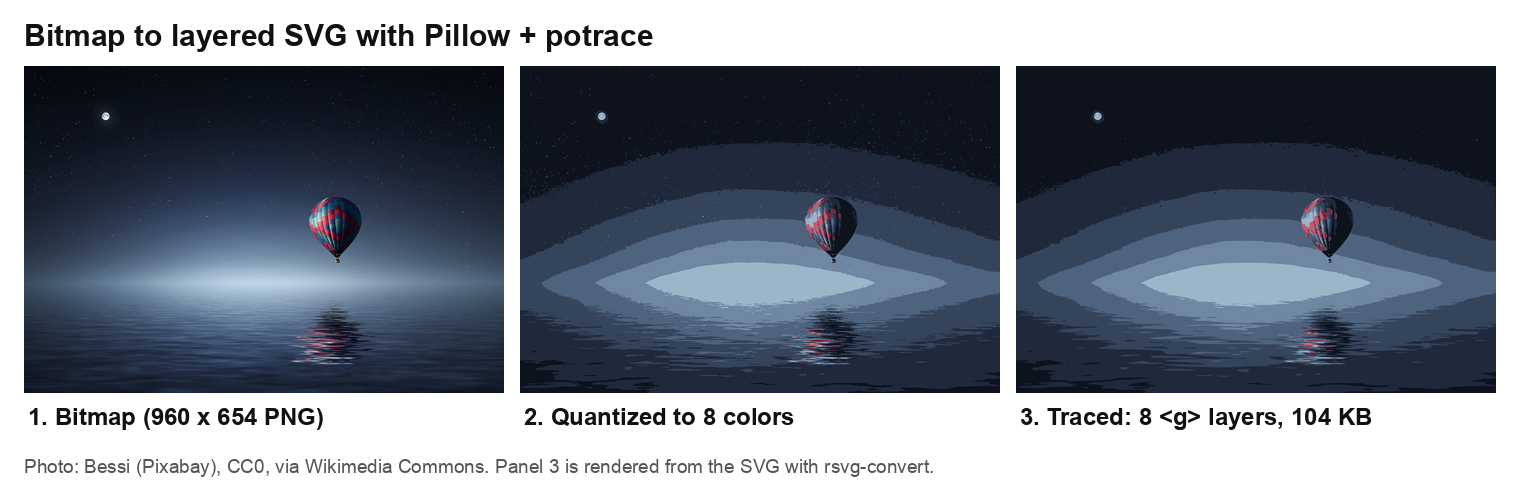
Bitmap, 8-color quantized bitmap, and the potrace-traced SVG with one <g> per color. Photo: Bessi (Pixabay), CC0, via Wikimedia Commons.
A layer per color only works if the number of colors is small and fixed, so the first step is color quantization: reducing the image to K colors. The quantizer decides what your layers will be, and on this photo the common choices dropped the balloon's red.
I asked Pillow for 8 colors with each method and dithering off. MEDIANCUT and FASTOCTREE spent all eight on shades of blue. The red went into the nearest blue bucket, so in those palettes the balloon has no layer of its own. MAXCOVERAGE with kmeans=3 kept two reds (#76273E and #C45B6E) next to six blues. Without the k-means pass, MAXCOVERAGE picked a mix that included pure black, near-white, teal and brown.
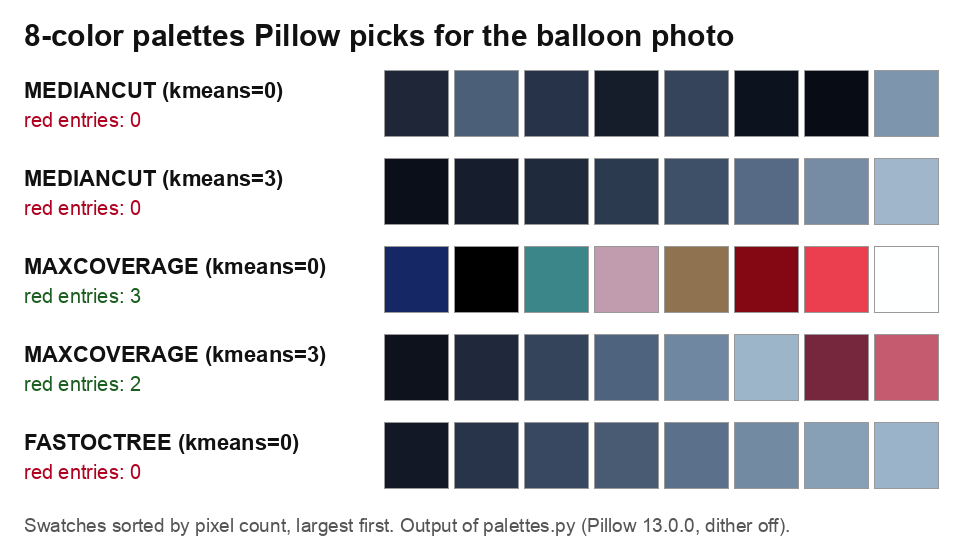
The 8-color palettes Pillow picks for this photo. Only MAXCOVERAGE keeps any red.
The lesson: print the palette before you trace. If a color you care about covers a small share of the image, a quantizer that weights by pixel count will merge it away. imagetracerjs's built-in quantizer had the same blind spot: its 8 colors were all blues.
Route 1: potrace, one color at a time
Potrace by Peter Selinger traces a two-color bitmap into smooth curves. It reads PBM, PGM, PPM and BMP. To get a colored, layered SVG, you run it once per palette color on a mask of that color, then wrap each result in a <g>:
# trace_layers.py, core loop (the full script adds argparse and writes the <svg> wrapper)
q = img.quantize(colors=8, method=Image.Quantize.MAXCOVERAGE,
                 dither=Image.Dither.NONE, kmeans=3)
idx, pal = np.array(q), q.getpalette()
order = [i for _, i in sorted(q.getcolors(), reverse=True)]   # biggest color at the bottom

def potrace(mask):
    with tempfile.TemporaryDirectory() as tmp:
        pbm = Path(tmp) / 'mask.pbm'
        Image.fromarray(~mask).convert('1').save(pbm)          # potrace traces BLACK pixels
        svg = subprocess.run(['potrace', '--svg', '--flat', '--turdsize', '4',
                              str(pbm), '-o', '-'], capture_output=True, text=True).stdout
    transform = re.search(r'<g transform="([^"]+)"', svg).group(1)
    d = ' '.join(re.findall(r'<path d="([^"]+)"', svg))
    return transform, d

layers = []
for pos, i in enumerate(order):
    color = '#%02X%02X%02X' % tuple(pal[3*i:3*i+3])
    mask = idx == i
    if not cutout:                                   # stacked: extend under the layers above
        mask = mask | np.isin(idx, order[pos + 1:])
    transform, d = potrace(mask)
    layers.append(f'<g id="layer-{pos}" fill="{color}">'
                  f'<path transform="{transform}" d="{d}"/></g>')
Two details cost me a run each. The mask has to be inverted (~mask), because in Pillow's 1-bit mode True is white and potrace traces black. And --flat merges each color into one path, so the group is easy to address and the file stays small.
Result: 8 groups, 104,445 bytes, 0.05 s for all eight potrace calls.
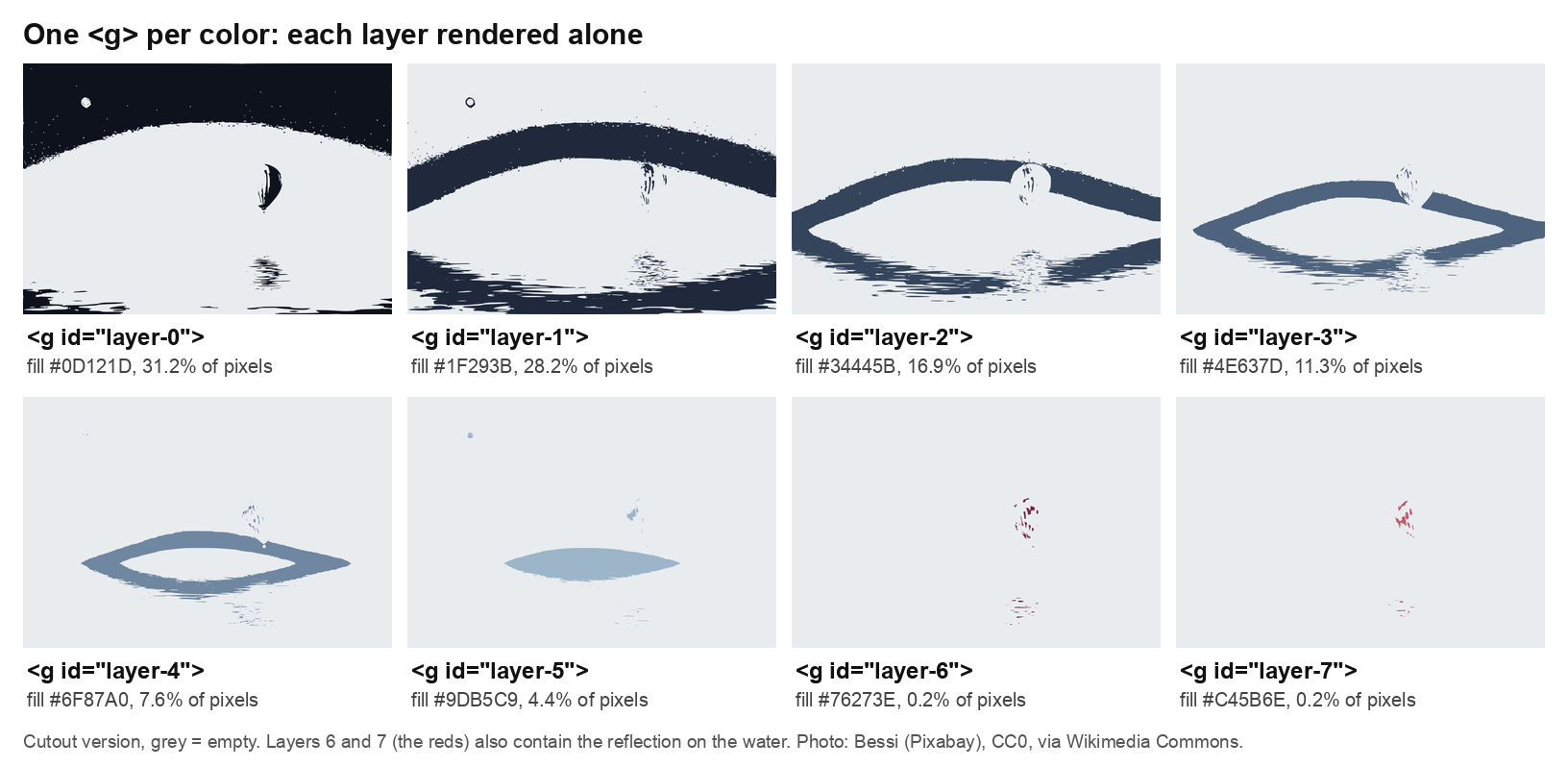
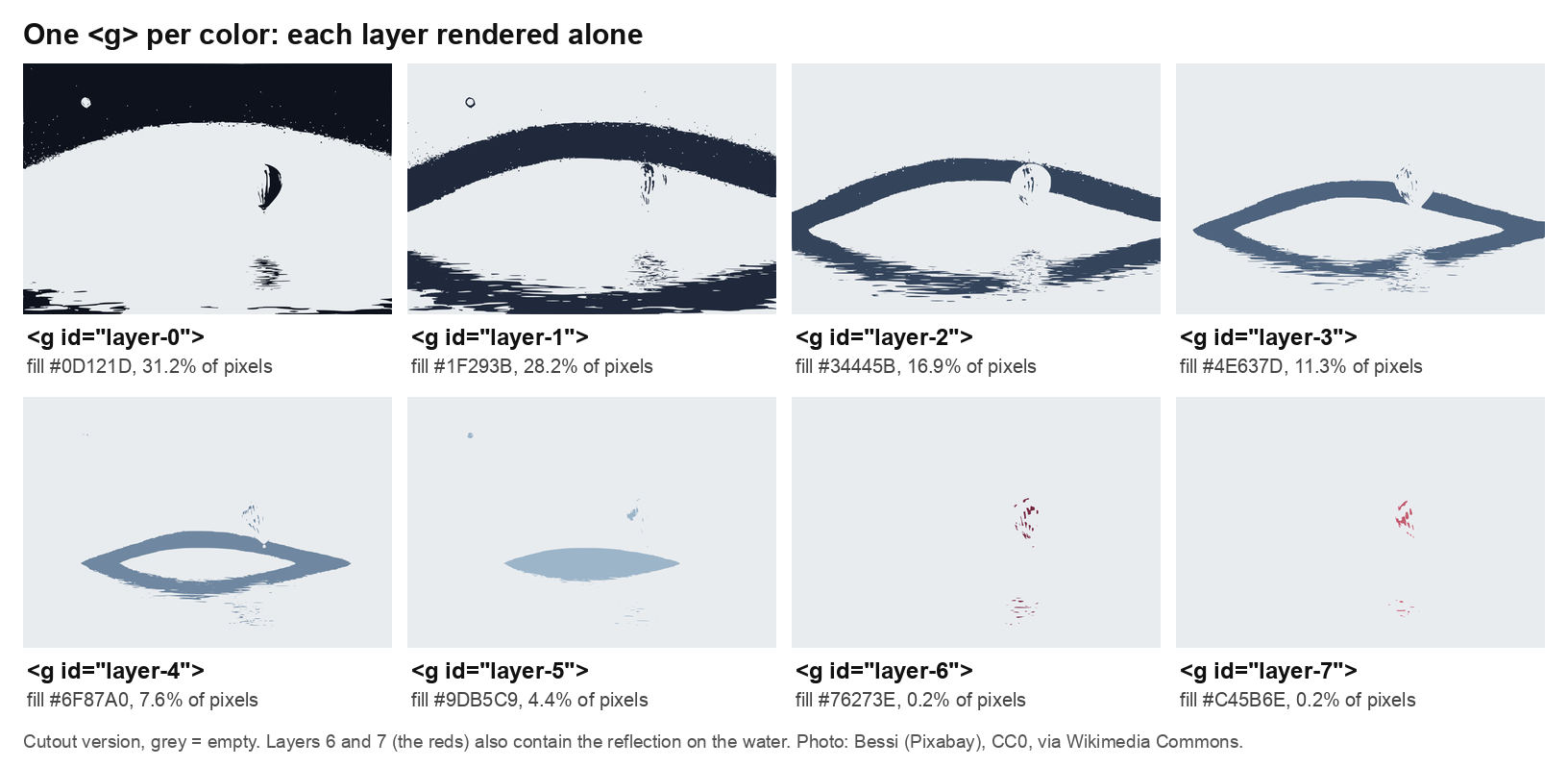
Each <g> rendered on its own (cutout version). The two red layers also hold the reflection. Photo: Bessi (Pixabay), CC0, via Wikimedia Commons.
Stacked or cutout
The if not cutout line is a choice you'll meet in every tracer. Cutout traces only the pixels of each color, so the shapes tile the canvas without overlapping. Stacked grows each layer underneath the layers above it, so the shapes overlap. I measured both against the 8-color bitmap, counting pixels that differ by more than 16 levels in any channel once the SVG is rendered on white:
- stacked: 2.36% of pixels off, 104,445 bytes
- cutout: 5.24% off, 179,518 bytes
Cutout is worse because neighboring shapes don't share an edge exactly, and the anti-aliased seams between them show the background through. The two modes also behave differently when you hide a layer, which matters later.
Route 2: VTracer in Python, then regroup by color
VTracer handles color itself, so the obvious plan is to feed it the 8-color bitmap and group its paths by fill. With 0.6.15 that breaks in two places.
First, the fills are not the palette. On the pre-quantized image, VTracer still produced 136 distinct fills across 231 paths, because each cluster's color is an average (#1E283A next to palette entry #1F293B). You have to snap each fill to the nearest palette color:
paths = re.findall(r'<path d="([^"]+)" fill="#([0-9A-F]{6})" transform="([^"]+)"/>', raw)

def nearest(hexcolor):
    rgb = tuple(int(hexcolor[k:k+2], 16) for k in (0, 2, 4))
    return min(range(K), key=lambda i: sum((a - b) ** 2 for a, b in zip(rgb, pal[i])))

layers = {}
for d, fill, transform in paths:
    layers.setdefault(nearest(fill), []).append(f'<path d="{d}" transform="{transform}"/>')
Second, grouping changes paint order. A stacked SVG depends on later paths covering earlier ones. Move every path of one color into one group and some small shapes end up underneath a big one they used to sit on top of. I rendered the snapped file in its original order and again after grouping:
hierarchical='stacked': grouping changed 6.64% of pixelshierarchical='cutout': 0.86%
So with VTracer, trace in cutout mode if you plan to regroup. My settings were mode='spline', filter_speckle=4, color_precision=8, layer_difference=16. The grouped cutout file came out at 509,596 bytes, 137 paths, 4.03% off.
VTracer 1.0 alpha: fixed palettes
The GitHub README documents a 1.0 engine (1.0.0-alpha.4, released 2026-08-29) with --palette, --max-colors and a seam-free --hierarchical cutout. On PyPI it is a pre-release, so you have to ask for it: pip install vtracer==1.0.0a4.
cfg = vtracer.Config(hierarchical='cutout', mode='spline', filter_speckle=4)
cfg.palette = ['#0D121D', '#1F293B', '#34445B', '#4E637D',
               '#6F87A0', '#9DB5C9', '#76273E', '#C45B6E']
cfg.convert_file('balloon-q8.png', 'v1.svg')
Every fill came back as an exact palette color, so grouping by fill needs no snapping, and regrouping the cutout output changed only 0.06% of pixels. The catch is the input. On the original photo the sky gradient came out as one flat color, and the result was 79.20% off. On the pre-quantized bitmap it was 3.84% off (195 paths, 225,630 bytes after grouping). Quantize first here too. Letting the 1.0 engine choose instead (cfg.max_colors = 8) also kept two reds, #75223A and #AF5066, in 200 paths and 119,007 bytes, but then the palette is VTracer's, not one you fixed in advance.
Route 3: imagetracerjs in Node
imagetracerjs by András Jankovics is a plain JavaScript tracer, so it runs in Node or the browser with no native code. It's the one tool here that already thinks in color layers: its trace data is layers[colorIndex][pathIndex], and desc: true writes desc="l 0 p 0" on every path. Grouping is a loop:
const traced = ImageTracer.imagedataToTracedata(imgd, { pal, colorquantcycles: 1, pathomit: 8,
                                                        ltres: 1, qtres: 1, strokewidth: 0 });
const groups = traced.layers.map((layer, i) => {
  const paths = layer.map((_, p) => ImageTracer.svgpathstring(traced, i, p, options)
    .replace(/ (fill|stroke|stroke-width|opacity)="[^"]*"/g, ''));
  return `<g id="layer-${i}" fill="${hex(traced.palette[i])}">${paths.join('')}</g>`;
});
Passing the 8 palette colors as pal with one quantize cycle keeps the reds. The output was 2,434 paths in 325,916 bytes, 9.05% off: it's cutout-style, and the seams show.
Results side by side
All runs used the same 8-color palette and the same 960×654 input. "Off" means the share of pixels differing by more than 16 levels from the quantized bitmap, rendered with rsvg-convert on white.
| Route | Bytes | <path> |
<g> |
Off |
|---|---|---|---|---|
| potrace, stacked | 104,445 | 8 | 8 | 2.36% |
| potrace, cutout | 179,518 | 8 | 8 | 5.24% |
| VTracer 0.6.15, cutout, snapped | 509,596 | 137 | 8 | 4.03% |
| VTracer 1.0.0a4, palette, quantized input | 225,630 | 195 | 8 | 3.84% |
| imagetracerjs 1.2.6, fixed palette | 325,916 | 2,434 | 8 | 9.05% |
For a layered SVG of a photo-like image, the potrace loop gave the smallest file and the closest match. VTracer is built to trace full-color images in one pass. The layer structure is the part you add, and that is where the extra steps come from.
How do you recolor or hide a layer in an SVG?
Once each color is a <g> and the paths inside carry no fill of their own, editing a layer is one attribute. fill is an inherited property in SVG (W3C SVG 2, Painting), so the children take the group's color. And display: none on a container removes it and all its descendants from rendering (SVG 2, Rendering).
In a page, that's CSS:
#layer-6, #layer-7 { fill: #E8A33D; }   /* recolor the reds */
#layer-5 { display: none; }             /* hide a layer */
In a build script, ElementTree does it without touching path data:
import xml.etree.ElementTree as ET
ET.register_namespace('', 'http://www.w3.org/2000/svg')

tree = ET.parse('balloon-layers.svg')
by_id = {el.get('id'): el for el in tree.iter() if el.get('id')}
by_id['layer-6'].set('fill', '#E8A33D')
by_id['layer-7'].set('display', 'none')
tree.write('edited.svg')
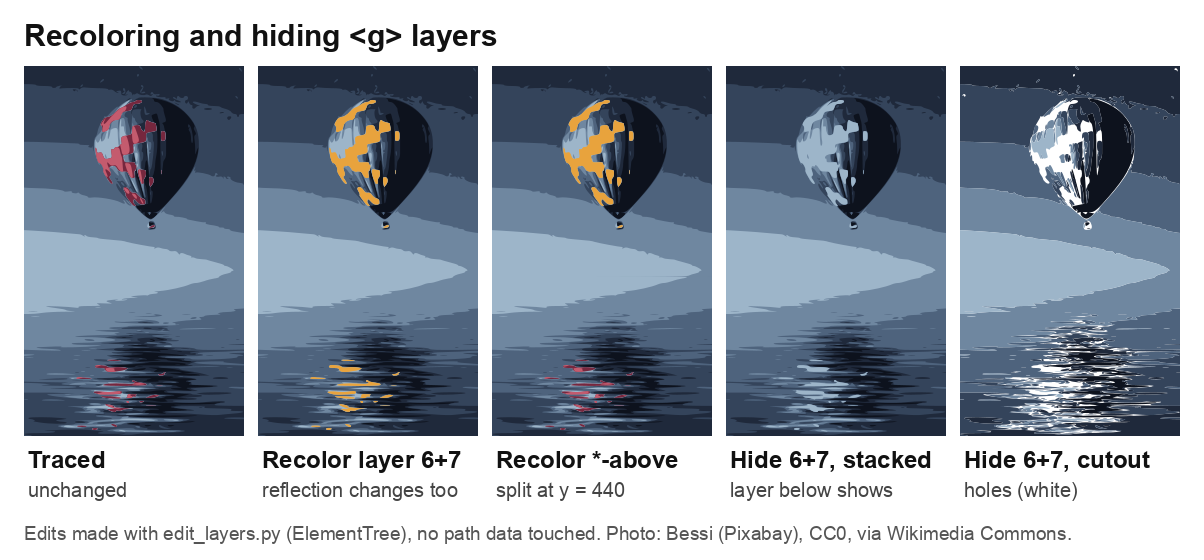
Recoloring and hiding <g> layers with ElementTree. Photo: Bessi (Pixabay), CC0, via Wikimedia Commons.
Hiding acts differently in the two modes. In the stacked file, hiding the red layers shows whatever is underneath, here the pale blue of layer 5, so the balloon looks repainted. In the cutout file it leaves holes. Pick the mode for the edit you expect to make.
Why aren't color layers the same as element layers?
Look at the red layers again. Of the 2,473 red pixels, 629 sit in connected regions centered below the horizon at y = 440: that's the reflection. Recolor layers 6 and 7 and the reflection turns gold along with the balloon. A color layer holds every pixel of one color, wherever it sits, and the balloon's blue panels sit in the same layers as the sky.
You can add a crude region rule. trace_layers.py --split-y 440 splits every color group into layer-N-above and layer-N-below, and recoloring only the -above groups changes the balloon but not the water. Watch the edge: without a one-row overlap between the halves, 499 pixels along the split line came out more than 16 levels off. With the overlap, 47 did. A horizontal line works here only because the scene has a horizon. Inkscape's Trace Bitmap works the same way: Multiple scans creates a separate object for each color scan (Inkscape Beginners' Guide).
Splitting by element is a different job: the balloon on one layer, the sky on another, any text on a third, each with all of its own colors. That needs segmentation, not quantization. If that's what you need, use an image to layers converter that separates objects instead of colors, then trace or edit each layer on its own.
One option is IntoLayers, which I work on. IntoLayers is an AI image-to-layers converter that splits a flattened PNG or JPEG into a rebuilt background plus a separate transparent layer for each element — text, subjects and graphics — and exports them as a layered PSD, transparent PNGs or a layered SVG. Things to know before you use it in a pipeline:
- Input is one PNG or JPEG per run, up to 10 MB.
- Besides the layered PSD and transparent PNGs, it can export a layered SVG traced in the browser.
- Text comes back as an image layer, not live editable type.
- Whatever sat behind another element is a guess, not a recovery. Whether it gets drawn depends on the image.
- Your first conversion (1K, 2 layers) runs without an account and can be downloaded.
FAQ
Potrace vs VTracer: which one for layered SVGs?
Potrace, if you control quantization and want small files. You run it once per color and the <g> structure is yours from the start. VTracer handles color on its own and keeps more detail, but its paths arrive ungrouped, so plan on a regroup step and cutout mode.
Which VTracer version does pip install vtracer give you?
0.6.15 as of 2026-10-25, with the convert_image_to_svg_py() API. The 1.0 engine with Config and palette is pip install vtracer==1.0.0a4, an alpha.
Why is my SVG bigger than the PNG? Photos are full of small shapes. The 8-color PNG here is 33,820 bytes. The best layered SVG is 104,445. SVG wins on flat artwork, logos and icons, not on gradients.
What do VTracer's main settings do?
Going by the option list in the README: filter_speckle discards patches smaller than that many pixels, color_precision is the number of significant bits kept per RGB channel, and layer_difference (--gradient-step on the 1.0 CLI) is the color difference between gradient layers. The 0.6.15 defaults are 4, 6 and 16. mode picks the curve fit (spline, polygon or none), and hierarchical picks stacked or cutout, which decides whether you can regroup paths without changing the picture.
Is there a VTracer web app or npm package?
Yes. visioncortex hosts a web demo that runs in the browser, and the 1.0 README lists a Node package, @visioncortex/vtracer, built to WebAssembly with no native dependency. The Node route above uses imagetracerjs instead, because its trace data is already split by color layer.
Can I hide a layer without leaving a hole? Yes, in stacked mode: each layer extends under the ones above it, so hiding one shows the next color down. In cutout mode the hidden area becomes transparent.
Can I get the text in an image as editable SVG text?
Not from any of these tools. Tracers output shapes, so text becomes outlines. Retyping it as a <text> element is a separate step.
Disclosure: I work on IntoLayers.
Comments
Join the discussionNo comments yet. Be the first to comment.